Primary Keys
- A unique ID for every row (e.g. student ID number)
- Guarantees we can find a specific record even if two people have the exact same name
We’ll be using the gapminder data set, curated by Jennifer Bryan in this module. Some of you may be familiar with the gapminder package in R - this is the same data set.
I am not proficient at interacting with SQL databases from python, and Gemini was used heavily in preparing these notes and examples.
What are some different ways we can store data?
Flat files are great for small, static datasets but they have issues when
Structured Query Language
Table: A collection of related data (e.g. countries).
Row (Record): One single entry (e.g. “Canada”).
Column (Field): A specific attribute (e.g. population).
Databases are strict (if a column is an Integer, you cannot put the word “Five” in it)
INTEGERTEXTREAL (float/double)BOOLEAN (logical)Relationships between tables are defined by key fields
We will be working with the Gapminder dataset today. It has columns: country, continent, year, lifeExp, pop, gdpPercap.
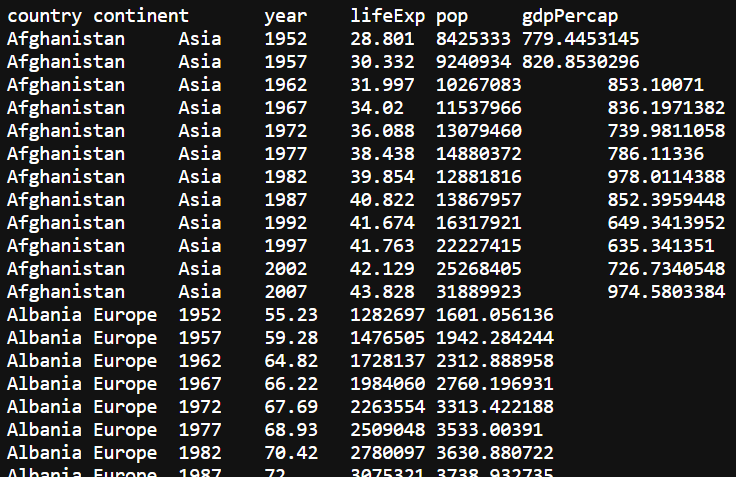
How can we break this single flat file into multiple relational tables?
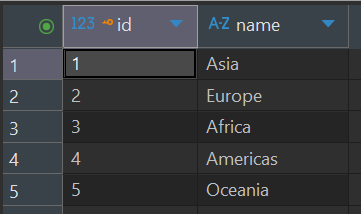
Table 1: continents
id (Primary Key)
name (e.g. Asia, Europe)
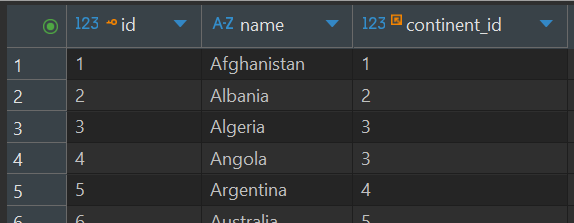
Table 2: countries
id (Primary Key)
name (e.g. Afghanistan)
continent_id (Foreign Key pointing to continents.id)
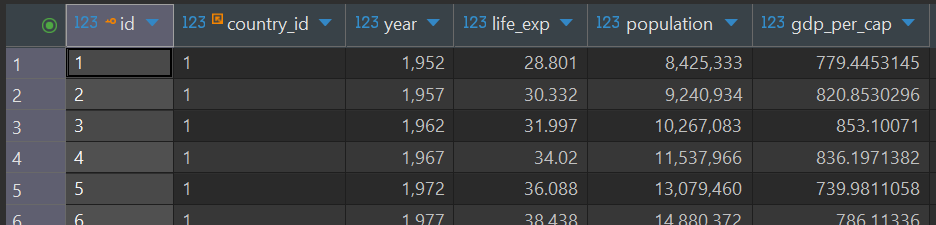
Table 3: observations
id (Primary Key)
country_id (Foreign Key pointing to countries.id)
year
life_exp
population
gdp_per_cap
Today we’ll be working with a normalized database containing Gapminder data (DBeaver is a nice GUI for working with SQL databases)
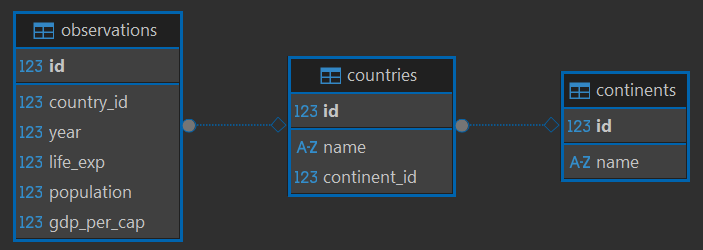
You’ll often see “CRUD” operations mentioned in the context of databases
Scenario: we want to include groups of nations in our database (e.g. European Union, NAFTA, NATO)
CREATE TABLE coalitions (id INTEGER PRIMARY KEY, name TEXT);
CREATE TABLE coalitions_contries (id INTEGER PRIMARY KEY,
                                  FOREIGN KEY (coalition_id) REFERENCES coalitions (id),
FOREIGN KEY (country_id) REFERENCES countries (id));Scenario: a brand new country has formed, and we want to add it to our database
INSERT INTO countries (name, continent_id)
VALUES ('Atlantis', 2); -- 2 is Europe's ID This is the most common use of SQL for data science.
Scenario: read the entire continents table from the database
Scenario: read year and life_exp for Canada in 2007
Scenario: Display the top 5 highest GDPs per capita in the database
Scenario: We know country_id = 72 had a high GDP per capita, but who is country 72?
We typically won’t want to update source data in the database, but if we do…
Scenario: we used the wrong name when we created our new country
Scenario: After giving it some thought, let’s remove New Atlantis from the database
If you don’t use a WHERE clause when updating or deleting data, you could end up changing more than you want. For example, this code will change the name of every country to “New Atlantis”:
UPDATE countries
SET name = "New Atlantis"sqlite3 library to execute our queries directly from pythonOpen up a new pytyon script in Positron and create a script to list the 3 countries with the highest life expectancy in 2007 using the starter code provided.
What happens when we hook up our database to a website and allow users to display information by year and someone enters this for the year?
2007; DROP TABLE countries;
Always use the ? syntax modeled in the starte code to make your code more secure.
# set up environment and connect to the database
import urllib.request
import sqlite3

# download the gapminder database
url = "https://github.com/BIFX547-26/gapminder/raw/refs/heads/main/inst/extdata/gapminder.db"
urllib.request.urlretrieve(url, "gapminder.db")

# Execute a query

# --- Best Practice: Parameterized Queries ---
# We NEVER use f-strings for SQL
# We use the '?' placeholder.
user_input = 72
cursor.execute("""
  SELECT countries.name, observations.year, observations.gdp_per_cap
    FROM observations
    INNER JOIN countries ON observations.country_id = countries.id
    WHERE countries.id = ?
    ORDER BY observations.gdp_per_cap DESC
    LIMIT 5;""",
  (user_input,))
# Notice the tuple here!

print("\nTop 3 Life Expectancies in 2007:")
for row in cursor.fetchall():
    print(f"{row[0]}: {row[1]:.1f} years")

# 5. Close connection when done
conn.close() Complete the code above and submit your script on Blackboard.